If you’re just starting with Apbook and need to check your transaction history, this guide is for you. From my two years of using it, I’ve avoided several mix-ups by staying on top of things. There’s no doubt that tracking your bets and funds is super simple and rewarding.
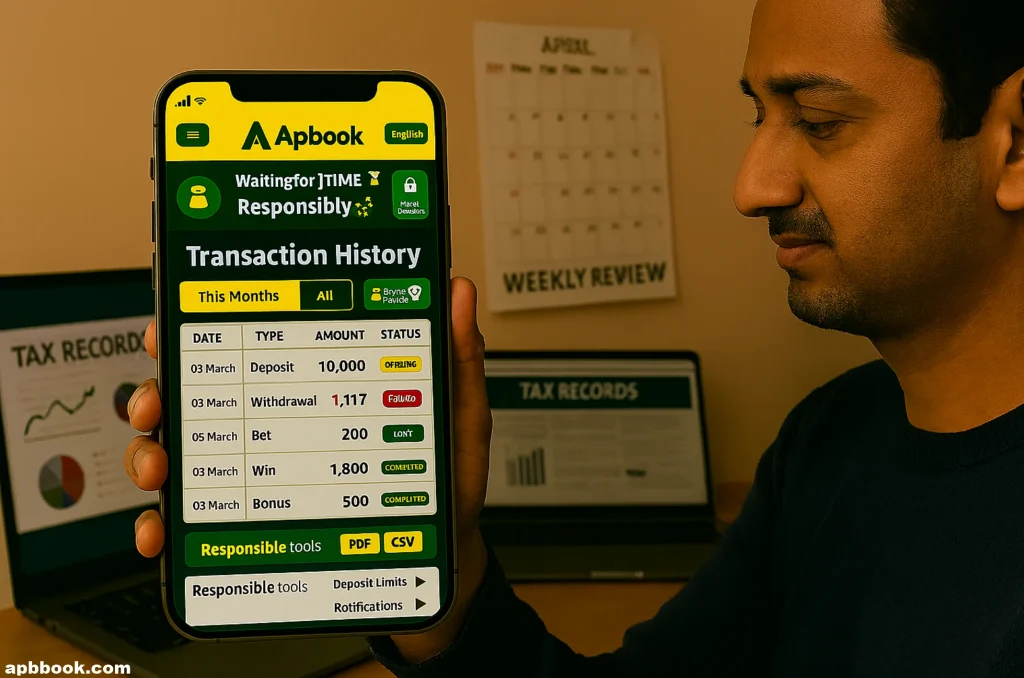
First, log into your Apbook account on your phone or computer. Click the profile icon in the top right corner to access the account section. From there, find the “Transaction History” under wallet options, and you’ll see all your activities listed clearly.
You can filter by dates or transaction types, like last month’s cricket bets. This makes reviewing specific details quick and simple. Now, let’s explore why regular checks are essential for smart betting.
What Exactly Is Transaction History on Apbook?
Transaction history acts like a personal diary of your money movements on the platform. It records every deposit, withdrawal, and bet you’ve made. I’ve often reviewed mine after big IPL games to understand my betting patterns better.
These records include dates, amounts, and statuses such as completed or pending. It’s all presented without complicated terms, making it easy for beginners. Checking it helps you maintain honesty with your spending habits.
Last year, I realized I was depositing too frequently from my history. This insight allowed me to adjust and bet more responsibly.
Why You Should Check Your Apbook Transaction History Regularly
Regular checks prevent unexpected issues, like spotting unauthorized charges early on. I’ve experienced this once, and Apbook’s support resolved it swiftly. It also aids in budgeting by showing expenses on slots or live games.
In places like India, you might need to report gambling wins for taxes. Your history serves as solid proof. I’ve used mine without any complications.
Moreover, it promotes responsible gambling, which Apbook encourages strongly. Tracking wins and losses keeps you in control and makes the experience enjoyable.
Reliving big wins or learning from losses adds fun. Each review offers new lessons for better decisions.
Step-by-Step: How to Access Transaction History on Apbook App
- Start by opening the Apbook app or downloading it safely from their site if needed.
- Log in using your ID and password, or reset if forgotten—it only takes seconds.
- Tap the menu icon, like three lines or your avatar, then select “My Account.
- Scroll to “Wallet” or “Transactions” and click “History” to view the list.
- Filter options let you choose by week, month, or year effortlessly.
- I’ve accessed it both on mobile and desktop countless times.
Understanding What You See in Your Apbook Transaction History
- Each entry has details, the date and time of the transaction first.
- Amounts appear next, positive for additions like wins, negative for deductions like bets.
- Type: include deposits, withdrawals, or bonuses with clear labels.
- Statuses: indicate if it’s pending, completed, or failed—check reasons for the latter.
- I’ve seen bonuses often show as promo credits, which can expire, so use them timely.
- If codes confuse you, Apbook’s help section or chat support clarifies everything.
Common Transaction Types on Apbook
Based on my experiences, here’s a handy table explaining typical transactions.
| Type | What It Means | Example |
| Deposit | Money added to your account | Added ₹500 via UPI |
| Withdrawal | Cash withdrawn to your bank | Withdrew ₹1000 to account |
| Bet Placed | Wager on a game or event | Bet ₹200 on cricket match |
| Win | Payout from a winning bet | Won ₹300 from slots |
| Bonus | Free credits from promotions | Got ₹100 referral bonus |
| Refund | Money returned for canceled bets | Refund ₹50 for voided game |
This table simplifies scanning your history effectively.
How to Download or Export Your Apbook Transaction History
In the history section, locate the “Download” button for a copy. Select dates and format like PDF or CSV, then save to your device. I’ve done this monthly to keep organized records.
Downloads are useful for taxes or personal tracking in spreadsheets. Apbook provides this feature free and instantly, without limits I’ve encountered.
If issues arise, try updating the app or switching browsers. It resolved a glitch for me once.
Troubleshooting: What If I Can’t See My Apbook Transaction History?
If the app crashes, restart your device or clear the cache in settings. Poor internet might be the culprit—switch to stable Wi-Fi.
For missing history, contact 24/7 support via chat; they fixed mine in minutes. New accounts show history from sign-up only.
Security prompts may require ID verification for access. This ensures your data stays protected.
Tips for Managing Your Transactions on Apbook Like a Pro
Here are some practical tips from my betting journey:
- Set deposit limits in Apbook settings to avoid overspending I’ve relied on this feature often.
- Review your history weekly, perhaps on Sundays, to catch trends early and adjust strategies.
- Enable transaction notifications for real-time updates on deposits or wins.
- Try different payment methods: UPI for quick deposits, banks for secure withdrawals.
- Stick to a budget rule, like betting only 5% of your fun money, for sustainable play.
- Always compare odds before placing bets; Apbook offers competitive ones for cricket.
These steps have made my experience smoother and more enjoyable.
Responsible Betting: Using History to Stay Safe
Betting should be fun, but reviewing history reveals if you’re chasing losses unwisely. I’ve taken breaks when patterns showed excessive risks, returning refreshed.
Apbook provides self-exclusion tools for needed pauses. Sharing experiences with friends keeps things balanced.
Explore their safer gambling resources for additional support. Remember, treat it as entertainment, not income.
Beyond Transactions: Exploring Apbook’s Other Features
Apbook offers live betting for excitement during matches. Their slots and live dealer games provide variety I’ve enjoyed.
Refer friends to earn bonuses—I’ve gained extra credits this way. Tailored odds for Indian users shine in cricket specials.
With top encryption, security feels reliable. I’ve never stressed about data breaches.
Personal Story: How Transaction History Saved My Day
During last IPL, I mistakenly thought a bet lost, but history showed a pending win. Support fixed the payout quickly after I shared details.
Another instance, I spotted a duplicate deposit and got a refund promptly. Without regular checks, I’d have overlooked these.
You won’t regret making history reviews a habit it’s truly a game-changer.
FAQs
Conclusion
You’ve got the full scoop on handling Apbook transaction history effectively. Start applying these tips to bet smarter and safer. From my experiences, staying informed transforms your gaming journey positively.